Field Journal Co.
Field Journal Co.
Category
SAAS, B2B
Role
Lucy Rivera
Duration
1 and a half months
1 and a
half months
Company
Elasticrun
Projected Impact
Reduction in manual coordination efforts
Reduction in manual coordination efforts
The centralized dashboard reduced dependency on manual coordination by bringing manpower, assets, attendance, and maintenance workflows into one unified system. This helped operations managers spend less time switching between teams and tools, enabling faster communication and smoother daily operations.
Let's understand 3PL and operations involved to begin with
Third-Party Logistics (3PL) companies manage complex operations involving inventory, fleet, warehouses, and real-time tracking. However, most existing systems are fragmented, making it difficult for stakeholders to make quick, data-driven decisions.
This project focuses on designing a unified, role-based dashboard system that streamlines operations, improves visibility, and enhances decision-making across logistics workflows.
Third-Party Logistics (3PL) companies manage complex operations involving inventory, fleet, warehouses, and real-time tracking. However, most existing systems are fragmented, making it difficult for stakeholders to make quick, data-driven decisions.
This project focuses on designing a unified, role-based dashboard system that streamlines operations, improves visibility, and enhances decision-making across logistics workflows.
The project began with project manager asking us to solve these issues


Problem Context
Meet Mr. Rajesh - a 3PL Operations Manager, juggles 4–5 tools to track attendance, manpower, and inventory.
Meet Mr. Rajesh - a 3PL Operations Manager, juggles 4–5 tools to track attendance, manpower, and inventory.


So where does the real problem lie?

Fragmented
systems
Fragmented
systems

Lack of
real-time visibility
Lack of
real-time visibility

Manual
workforce management
Manual
workforce management

Difficulty managing
multiple warehouses
Difficulty managing
multiple warehouses
Target Users


Primary Research to understand the context better
We began with a few guiding questions to find current warehouse problems and decide which features our
new platform needed most.
We began with a few guiding questions to find current warehouse problems and decide
which features our new platform needed most.


To answer these, we conducted an on-site interview with a
warehouse manager to understand their real-world environment.
To answer these, we conducted an on-site interview with a warehouse manager to understand their real-world environment.
To answer these, we conducted an on-site interview
with a warehouse manager to understand their
real-world environment.

Figuring out the actual problem
Through our primary interviews, I identified the hidden gaps between how managers, tools, and data interact.
Through our primary interviews, I identified the hidden gaps between how managers, tools,
and data interact.
The large amount of data was a bit overwhelming to understand all at once, so we converged the information into three distinct methods
The large amount of data was a bit overwhelming
to understand all at once, so we converged the
information into three distinct methods


Task Prioritization for 3PL Operations Manager

Initial Flow at a Glance

Mapping the Current Journey -
Understanding the Flows and
Key Concerns
Mapping the Current Journey -
Understanding the Flows and
Key Concerns

Primary Workflows:
A Deep Dive into Two Core Sections
Primary Workflows:
A Deep Dive into
Two Core Sections
Asset Management
Attendance Management
Asset Management
Attendance Management


Information Architecture

Design Direction - UI Design Consideration
Design Direction -
UI Design Consideration


Initial Approach
Challenges
Too many competing visual elements
make it hard to spot urgent issues quickly.
Large circular charts take up a lot of room
but only show a little bit of information.
The screen mostly shows status updates
instead of highlighting which urgent tasks
need immediate action.
Key buttons like "Create Task" are tucked
away inside small cards instead of being easy
to find globally.
Too many competing visual elements make it hard to spot urgent issues quickly.
Large circular charts take up a lot of room but only show a little bit of information.
The screen mostly shows status updates instead of highlighting which urgent tasks need immediate action.
Key buttons like "Create Task" are tucked away inside small cards instead of being easy to find globally.
Too many competing visual elements
make it hard to spot urgent issues quickly.
Large circular charts take up a lot of room but only show a little bit of information.
The screen mostly shows status updates instead of highlighting which urgent tasks need immediate action.
Key buttons like "Create Task" are tucked away inside small cards instead of being easy to find globally.
Clearer visualization for high-volume operational data
Clearer visualization for high-volume operational data
Clearer visual indication for adding new tasks
Clearer visual indication for adding new tasks
Updated Wireframe after Multiple Iterations
Updated Wireframe after
Multiple Iterations

New Approach
Introduced a "Top Actions For You" section
to immediately highlight urgent tasks and
alerts.
Replaced full circular donuts with
semi-circles and compact bar graphs to
show more data in less space.
Added a dedicated "Billing Summary" with
status tracking (Paid vs. Outstanding) to
connect operations with revenue.
Used distinct card sizes and grouped
"Quick Actions" together to better guide the
user's workflow.
Introduced a "Top Actions For You" section to immediately highlight urgent tasks and alerts.
Replaced full circular donuts with semi-circles and compact bar graphs to show more data in less space.
Added a dedicated "Billing Summary" with status tracking (Paid vs. Outstanding) to connect operations with revenue.
Used distinct card sizes and grouped "Quick Actions" together to better guide the user's workflow.
1. Introduced a "Top Actions For You" section to immediately highlight urgent tasks and alerts.
Replaced full circular donuts with
semi-circles and compact bar graphs to
show more data in less space.
3. Added a dedicated "Billing Summary" with status tracking (Paid vs.Outstanding) to connect operations with revenue.
Used distinct card sizes and grouped
"Quick Actions" together to better guide the user's workflow.
Dedicated billing summary with payment status
Grouped "Top Actions" together
Let's dive into the final solution
Let's dive
into the final solution
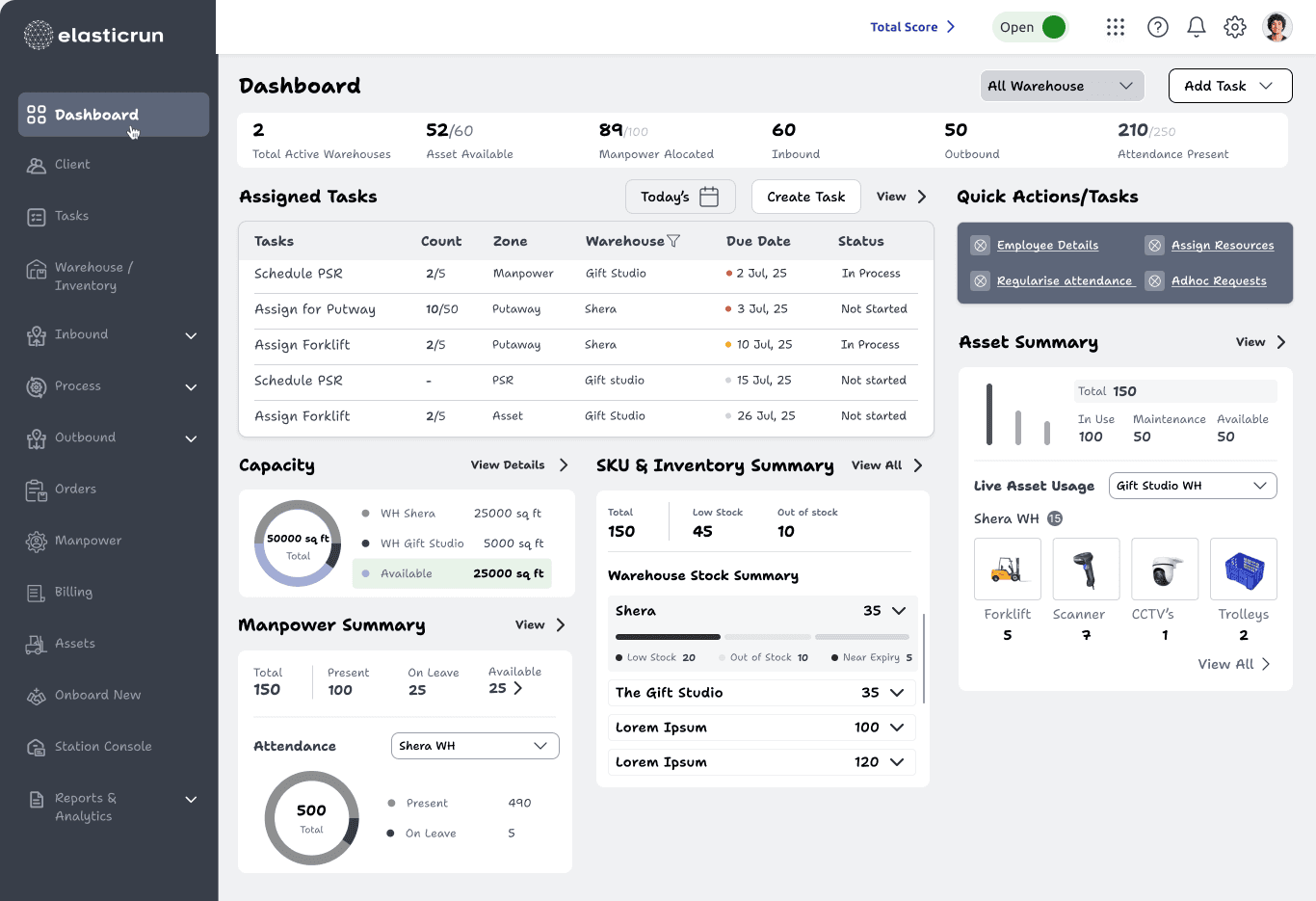
Presenting
3PL Operations Dashboard
3PL Operations Dashboard


Manpower Management
Manpower Management
Manpower Management
Problem
Problem
Operations teams struggled to quickly identify available manpower across shifts and tasks.
Operations teams struggled to quickly identify available manpower across shifts and tasks.
UX Decision
UX Decision
Designed centralized workforce tracking with availability, assignment, and shortage visibility in one place.
Designed centralized workforce tracking with availability, assignment, and shortage visibility in one place.
Impact
Impact
Reduced coordination effort and improved workforce allocation efficiency.
Reduced coordination effort and improved workforce allocation efficiency.
Asset Management
Asset Management
Problem
Problem
Managers lacked visibility into real-time asset availability and maintenance status.
Managers lacked visibility into real-time asset availability and maintenance status.
UX Decision
UX Decision
Introduced live operational status indicators:
Active
Idle
Under Maintenance
Delayed
Introduced live operational status indicators:
Active
Idle
Under Maintenance
Delayed
Impact
Impact
Improved operational awareness and reduced dependency on manual follow-ups.
Improved operational awareness and reduced dependency on manual follow-ups.


Attendance Management
Attendance Management
Problem
Problem
Managers found it difficult to monitor attendance issues quickly during daily operations.
Managers found it difficult to monitor attendance issues quickly during daily operations.
UX Decision
UX Decision
Prioritized attendance summaries, absentee alerts, and quick filtering for faster operational scanning.
Prioritized attendance summaries, absentee alerts, and quick filtering for faster operational scanning.
Impact
Impact
Enabled quicker operational adjustments and faster issue identification.
Enabled quicker operational adjustments and faster issue identification.
Roster Management
Roster Management
Problem
Problem
Manual roster planning created scheduling conflicts and workforce imbalance.
Manual roster planning created scheduling conflicts and workforce imbalance.
UX Decision
UX Decision
Introduced structured shift planning with conflict visibility and workforce balancing support.
Introduced structured shift planning with conflict visibility and workforce balancing support.
Impact
Impact
Improved scheduling efficiency and reduced roster conflicts.
Improved scheduling efficiency and reduced roster conflicts.
Assign to Client
Assign to Client
Problem
Problem
Teams lacked a unified workflow to allocate manpower and assets based on client requirements.
Teams lacked a unified workflow to allocate manpower and assets based on client requirements.
UX Decision
UX Decision
Created a centralized assignment flow connecting client needs with available operational resources.
Created a centralized assignment flow connecting client needs with available operational resources.
Impact
Impact
Reduced manual coordination and improved allocation efficiency.
Reduced manual coordination and improved allocation efficiency.
Projected Operational Impact
Projected Operational Impact
Reduced average navigation depth to 2–3 clicks for critical actions
Consistent design system across 10+ screens ensuring zero visual inconsistency
~30-40% reduction in manual coordination effort
Unified typography, color, and spacing system ensuring accessibility and readability across all dashboards
Reduced average navigation depth to
2–3 clicks for critical actions
Consistent design system across 10+ screens ensuring zero visual inconsistency
~30-40% reduction in manual coordination effort
Unified typography, color, and spacing system ensuring accessibility and readability across all dashboards
Reduced average navigation depth to 2–3 clicks for critical actions
Consistent design system across 10+ screens ensuring zero visual inconsistency
~30-40% reduction in manual coordination effort
Unified typography, color, and spacing system ensuring accessibility and readability across all dashboards
Reflections & Closing Note
Reflections & Closing Note
1. Took end-to-end ownership—from understanding messy workflows to shaping a clear, usable solution
Learned the importance of designing interconnected systems instead of isolated screens in operational environments.
Focused on making things clearer, faster, and easier to act on.
Learned to turn complex data into simple tools that help warehouse managers make fast, smart decisions.
Took end-to-end ownership—from understanding messy workflows to shaping a clear, usable solution
Learned the importance of designing interconnected systems instead of isolated screens in operational environments.
Focused on making things clearer, faster, and easier to act on.
Learned to turn complex data into simple tools that help warehouse managers make fast, smart decisions.
Took end-to-end ownership—from understanding messy workflows to shaping a clear, usable solution
Learned the importance of designing interconnected systems instead of isolated screens in operational environments.
Focused on making things clearer, faster, and easier to act on.
Learned to turn complex data into simple tools that help warehouse managers make fast, smart decisions.